AI Face Tracker
Updated: 10 Jul 2026
Import ONNX models in the Google MediaPipe format to do face detection and face landmark tracking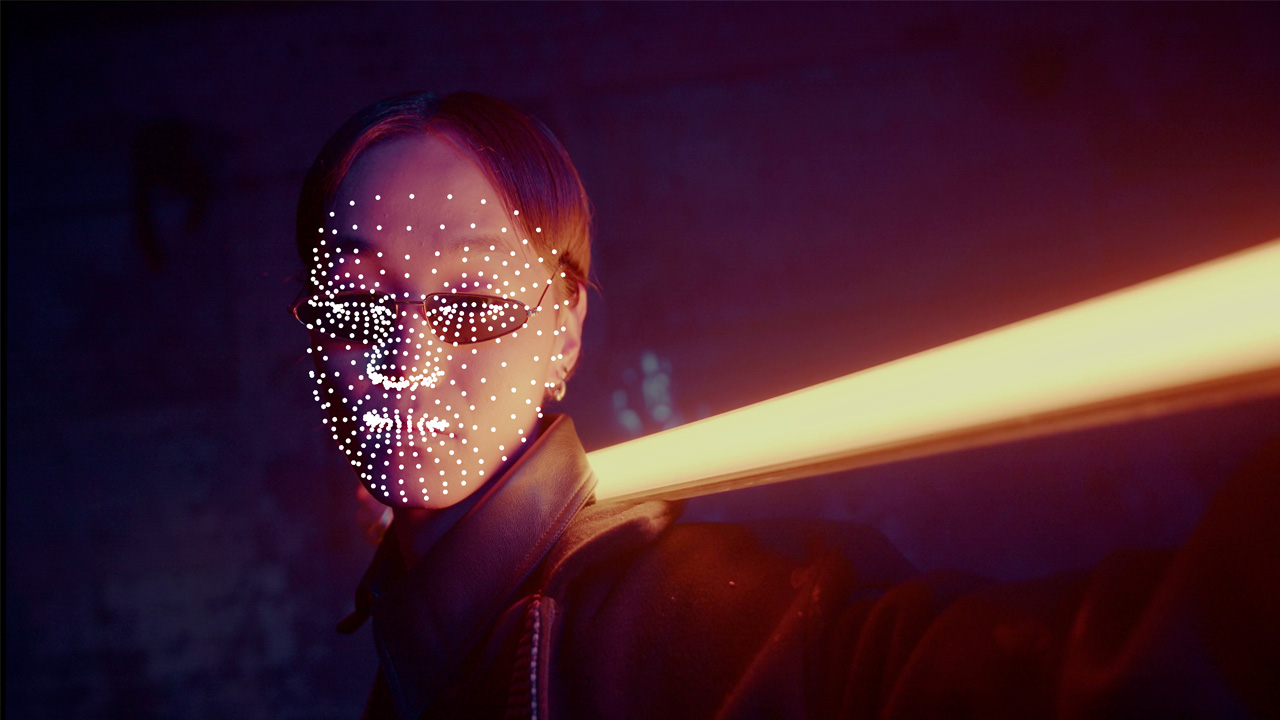
Updated: 10 Jul 2026
Import ONNX models in the Google MediaPipe format to do face detection and face landmark tracking
This node uses ONNX models. Before using this node, ensure your machine is configured to support ONNX models by following the instructions in the Working with AI Models page.
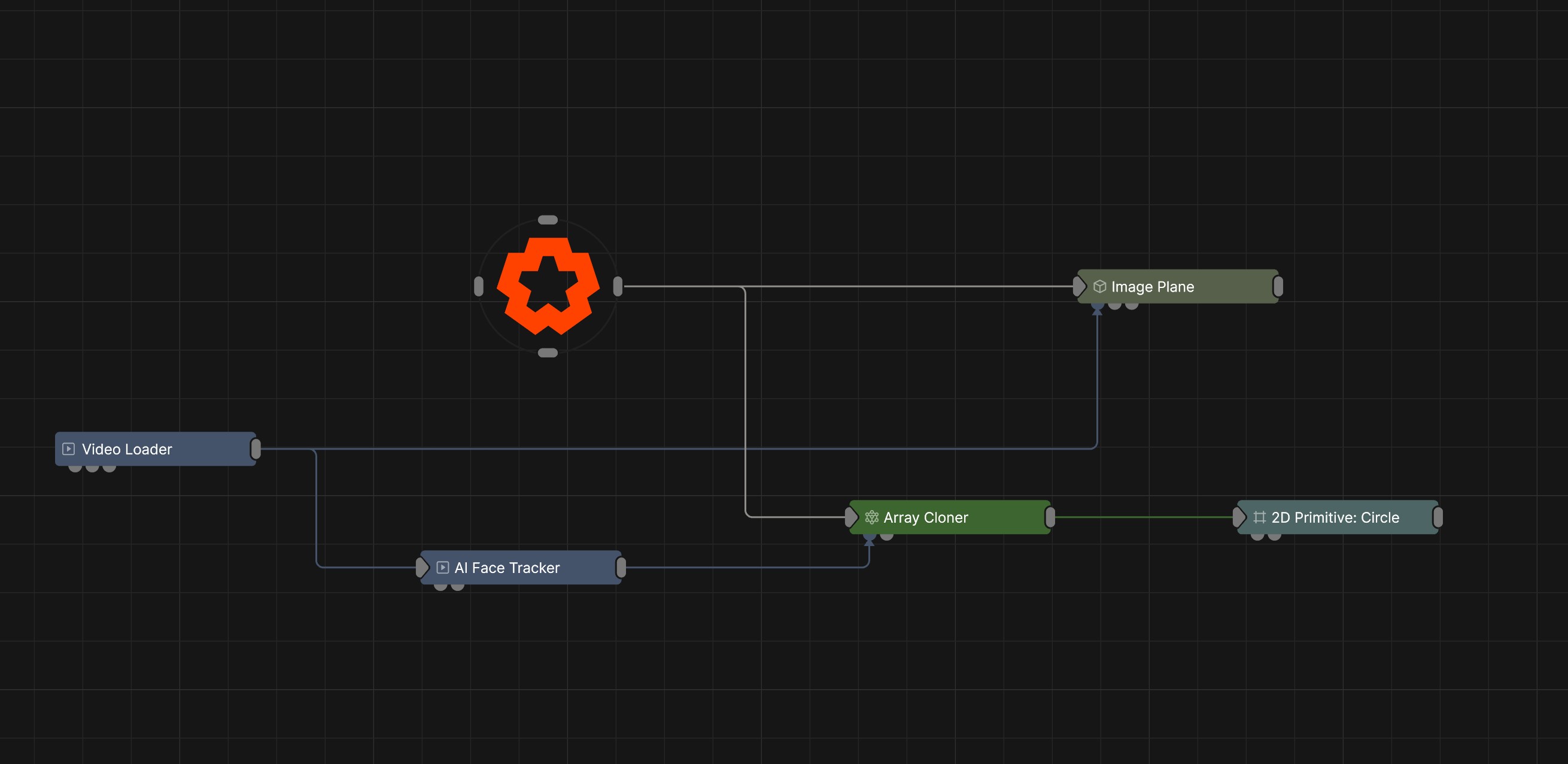
This node provides face tracking from a live video feed using the following input nodes:
The output can be linked to a Transform Array Source on an Array Cloner.
When connected to these output nodes, the node generates clones from a number of ‘face landmarks’ produced by the face landmark AI model.
This node has been developed to work with the Google MediaPipe Face Pose detection and Face landmark AI models. MediaPipe is an open-source framework developed by Google for building computer vision and machine learning pipelines.
The converted model ONNX files for use with this node can be downloaded below.
These models are derived from those available as part of the MediaPipe open source project. They are licensed under the Apache License, Version 2.0 (the “Licence”); you may not use these files except in compliance with the Licence. You may obtain a copy of the Licence at http://www.apache.org/licenses/LICENSE-2.0. Unless required by applicable law or agreed to in writing, software distributed under the Licence is distributed on an “AS IS” BASIS, WITHOUT WARRANTIES OR CONDITIONS OF ANY KIND, either express or implied. See the Licence for the specific language governing permissions and limitations under the Licence.
Additional notice for MediaPipe files under tasks/cc/text/language_detector/custom_ops/utils/utf/: The authors of this software are Rob Pike and Ken Thompson. Copyright (c) 2002 by Lucent Technologies. Permission to use, copy, modify, and distribute this software for any purpose without fee is hereby granted, provided that this entire notice is included in all copies of any software which is or includes a copy or modification of this software and in all copies of the supporting documentation for such software. THIS SOFTWARE IS BEING PROVIDED “AS IS”, WITHOUT ANY EXPRESS OR IMPLIED WARRANTY. IN PARTICULAR, NEITHER THE AUTHORS NOR LUCENT TECHNOLOGIES MAKE ANY REPRESENTATION OR WARRANTY OF ANY KIND CONCERNING THE MERCHANTABILITY OF THIS SOFTWARE OR ITS FITNESS FOR ANY PARTICULAR PURPOSE.
This model has been prepared for use in Notch by converting the original MediaPipe models to ONNX format. The following steps were taken to prepare the model:
pip install tf2onnx tensorflow

then for all models run (changing source and destination filenames):
python -m tf2onnx.convert --opset 16 --tflite ".\<modelname>.tflite" --output ".\<modelname>.onnx"
The Face Pose Detection Model needs to be loaded as a resource and set in the ONNX Model (Face Pose) resource property. The Face Landmarks Model needs to be loaded as a resource and set in the ONNX Model (Face Tracker) resource property.
Setting the incorrect ONNX models to the model resource properties will result in a non-working node.
When the node is set up with the required ONNX models, faces can be detected and face landmarks tracked.
A maximum of 32 faces can be tracked simultaneously, but in reality the overhead of the AI model inference passes is quite high on both the CPU and GPU, so a reduced face count may be a more realistic goal within real-time constraints.
The AI face tracking model has the following characteristics:
Visualisation of tracking information (both face pose and landmark information) can be performed. This information can be visualised when the node is in Previewing mode.
These properties control the core behaviours of the node.
| Parameter | Details |
|---|---|
| Preview In Viewport |
Preview the generated image as an overlay in the viewport.
|
| Apply PostFX Before Alpha Image Input (Legacy) | When enabled, the alpha input image is applied after the postfx pass, overwriting any effects the postfx would have applied to the alpha channel. |
| Legacy Effect Mask Blend | Blend input masks using the legacy behaviour kept for pre-2022 scenes. Leave disabled for new compositions. |
| Active | Enables or disables the effect. Disabling the effect means it will no longer compute, so disabling a node when not in use can improve performance. |
| ONNX Model (Face Pose) | Select the Media Pipe Face detection model which calculates head position and rotation/orientation. |
| ONNX Model (Face Tracker) | Select the Media Pipe Face landmark model which tracks facial points such as eyes, nose etc. |
| Pose Confidence Threshold | Minimum confidence for facial landmarks to be trusted. If the confidence falls below the threshold, the face landmarks model has failed to detect the face correctly (face pose is too extreme for the model to detect key features). |
| Pose Overlap Threshold | Determines when overlapping detections are considered the same face (The minimum non-maximum-suppression threshold for face detection to be considered overlapped). |
| Landmark Confidence Threshold | Minimum confidence for facial landmarks to be trusted. |
| Filtering Enabled | Enables the filtering tool. |
| Filtering Min Cutoff (noise reduction) | Filters noise from the input tracked positions. |
| Filtering Beta (movement) | If your face subject is moving around the input frame either moderately or fast, this smooths that motion but can introduce lag, increase this value if you want it to be more responsive. |
| Filtering Derivative Cutoff (transition) | This changes how reactive the filter is from still to moving (the curve until it works at 100% driven by velocity). |
| Cloning Mode | Control which landmarks are used as cloning points |
| Cloning Output Mode |
Control how the cloned points are transformed in space.
|
| Cloning Inherits Rotation | Clones orientate with the bank of the tracked face. |
| Cloning Inherits Scale | Clones scale is overridden by the size of the face in the source input footage. Only available with ‘Face’ Cloning mode. |
| Output Face Mask | When set, the output of this node will contain a face mask image with a mask per face detected. |
The properties control the visualisation of the tracked data.
| Parameter | Details |
|---|---|
| Visualisation Mode |
Enable the visualization preferences.
|
| Show Detection Bounds | When previewing the node, it will visualise the bound box of the tracking. |
| Show Detection Key Points | When previewing the node it will visualise the tracking of key features. |
| Show Detection Landmarks | When previewing the node it will visualise the Landmark’s tracking information. |
| Show Face Mesh | When previewing the node it will visualise a wire frame face mask. |
| Show Crop Textures | Draw the cropped texture regions the tracker analyses over the composition. |
The properties control the time at which the node is active. See Timeline for editing time segments.
| Parameter | Details |
|---|---|
| Duration |
Control the duration of the node’s time segment.
|
| Node Time | The custom start and end time for the node. |
| Duration (Timecode) | The length of the node’s time segment (in time). |
| Duration (Frames) | The length of the node’s time segment (in frames). |
| Time Segment Enabled | Set whether the node’s time segment is enabled or not in the Timeline. |
| Name | Description | Typical Input |
|---|---|---|
| Effect Mask | Mask out areas that Post-FX applied to this node won’t be applied. | Video Loader |
| Alpha Image | Use a separate video nodes luminance values to overwrite the alpha channel of the image. | Video Loader |
| Parameter Value Array | Used to set the parameters of the node using a float array. |