

Cloner To Array
Updated: 29 Jun 2026
Creates an array from a cloner system.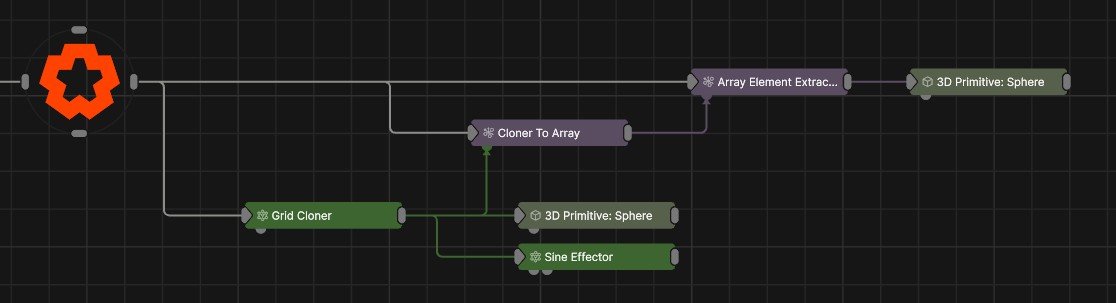
Updated: 29 Jun 2026
Creates an array from a cloner system.
This node creates an Array from a cloner system.
This lets you take all of the visual effects you can achieve with cloner systems and start using them interactively. By feeding the array with a cloner system, you can then pick out individual elements of the cloner system and attach objects to them. For example, in interactive projects, attaching a Hot Zone via an Array Element Extractor, and detect a trigger whenever anything enters the space of one of your cloned objects.
See the Array Sources for an overview on the use cases of Arrays.
| Parameter | Details |
|---|---|
| Position X | The objects position along the local x-axis. |
| Position Y | The objects position along the local y-axis. |
| Position Z | The objects position along the local z-axis. |
| Rotation Heading | The objects rotation around the local y-axis. |
| Rotation Pitch | The objects rotation around the local x-axis. |
| Rotation Bank | The objects rotation around the local z-axis. |
| Scale X | The objects scale along the local x-axis. |
| Scale Y | The objects scale along the local y-axis. |
| Scale Z | The objects scale along the local z-axis. |
| Parameter | Details |
|---|---|
| Position | Toggle inheritance of the Position from the parent. |
| Rotation | Toggle inheritance of the Rotation from the parent. |
| Scale | Toggle inheritance of the Scale from the parent. |
| World Position Only | Inherit the world position from the parent only, rotation and scale will be ignored. Overrides above properties. |
| Inherit Time | Toggle inheritance of time from the parent. |
| Parameter | Details |
|---|---|
| Max Element Count | Max number of elements for this node to track. Essentially the maximum clone index that will be included in the array. |
| Low Latency (Slower) | Reduces the number of frames of latency by which elements are updated in the transform array. However the calulation will take longer per frame. |
| Apply Node Transform To Array Elements Only | When Enabled, transform changes applied to this nodes transform properties will also be applied to the array elements, and carried onto any nodes this data is used. |
The properties control the time at which the node is active. See Timeline for editing time segments.
| Parameter | Details |
|---|---|
| Duration |
Control the duration of the node’s time segment.
|
| Node Time | The custom start and end time for the node. |
| Duration (Timecode) | The length of the node’s time segment (in time). |
| Duration (Frames) | The length of the node’s time segment (in frames). |
| Time Segment Enabled | Set whether the node’s time segment is enabled or not in the Timeline. |
| Name | Description | Typical Input |
|---|---|---|
| Cloner Source | Cloner to make array from. | Grid Cloner |
| Transform Modifiers | Apply the transforms of another node to this node. | Null |
| Target Node | Modifiy the rotations of the node to always direct the z axis towards the input. | Null |
| Local Transform Override | Apply the transforms of another node to this node, relative to its parent. | Null |
| Parameter Value Array | Used to set the parameters of the node using an array. | Parameter Array |