

OSC Float Array
Updated: 15 Jun 2026
Receives an array of floats via OSC.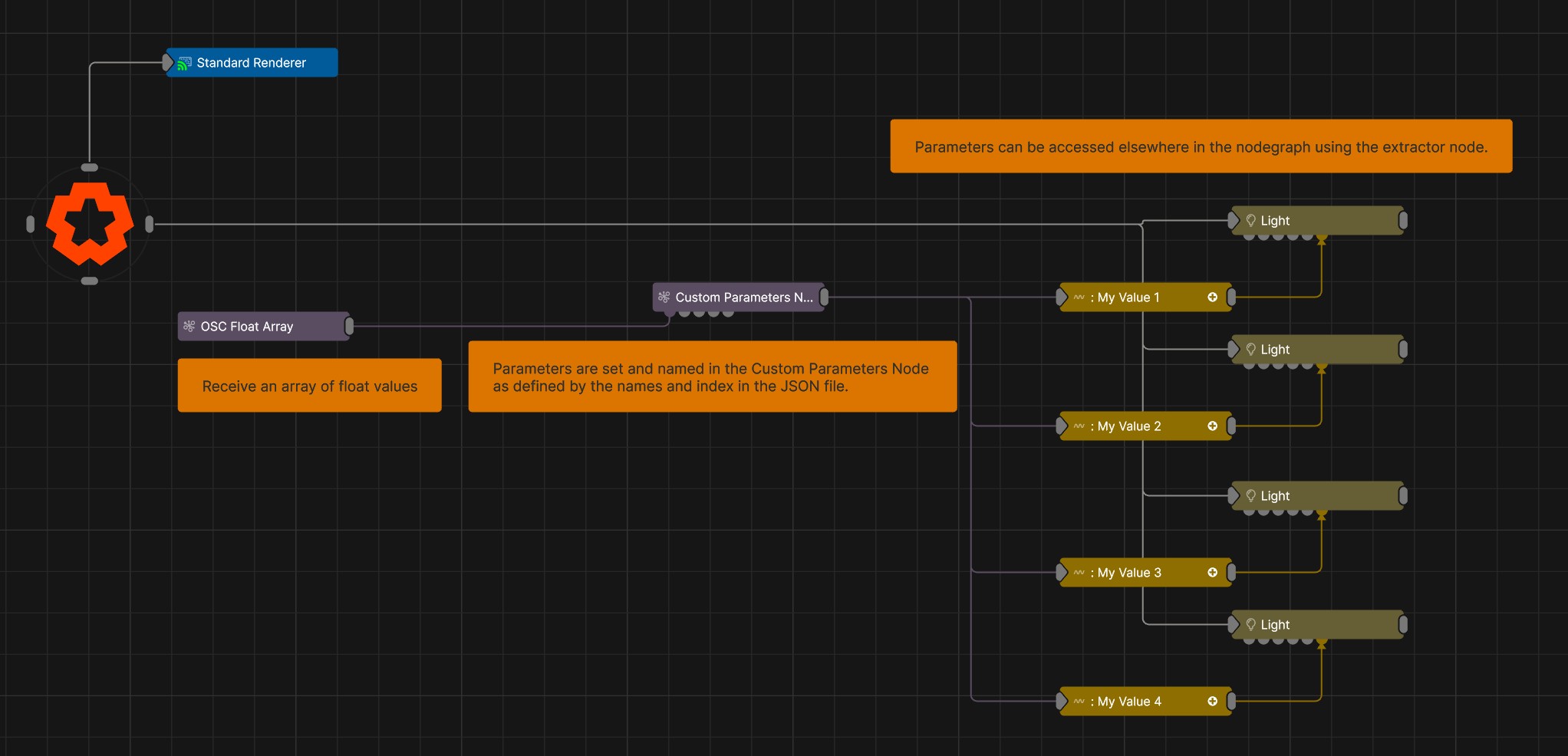
Updated: 15 Jun 2026
Receives an array of floats via OSC.
This node creates an array of floats from an OSC message, on a specific OSC address.
This node uses OSC, so you must have OSC enabled in your Project Settings in order to use it.
OSC messages can contain multiple arguments, meaning that you can receive several float values at a time. One way of working with multiple arguments form an OSC message is using the OSC Modifier, and selecting which argument to receive using the “OSC Channel Value Index” parameter. But when you want to receive a lot of values form one OSC message and apply them across your scene, this requires a lot of nodes, and a lot of patching of those nodes together.
All the OSC float array really does is let you do is receive all those modes in one place. But that opens up some new workflows, using the Custom Parameters and the Float Array To Points node.
There is more detail on the specific nodes pages, but the Custom Parameters node lets you either take your OSC float array’s data and apply it directly to control multiple parameters on a node at once via one connection, or create your own custom parameters that you can then receive, extract and apply anywhere else across your node graph.
The Float Array To Points will turn your array into a series of points in 3D space.
| Parameter | Details |
|---|---|
| OSC Address | Select the OSC address that you want to receive OSC float arrays from. e.g: /floatarray |
| Max Array Size | Sets the maximum size of the float array. Any floats stored after this index in the array will be removed/cut off. |
| Index Offset | Sets the starting point of the float array. Any floats stored before this index in the array will be removed/cut off. |
The properties control the time at which the node is active. See Timeline for editing time segments.
| Parameter | Details |
|---|---|
| Duration |
Control the duration of the node’s time segment.
|
| Node Time | The custom start and end time for the node. |
| Duration (Timecode) | The length of the node’s time segment (in time). |
| Duration (Frames) | The length of the node’s time segment (in frames). |
| Time Segment Enabled | Set whether the node’s time segment is enabled or not in the Timeline. |
This node has no inputs.
| Name | Description | Typical Input |
|---|---|---|
| Float Array | Takes a float array as an input | Float Array |
| Parameter Value Array | Used to set the parameters of the node using an array. | Parameter Array |