

Colour Gradient
Updated: 29 Jun 2026
Generate and edit colour gradients using an arbitrary number of colour points.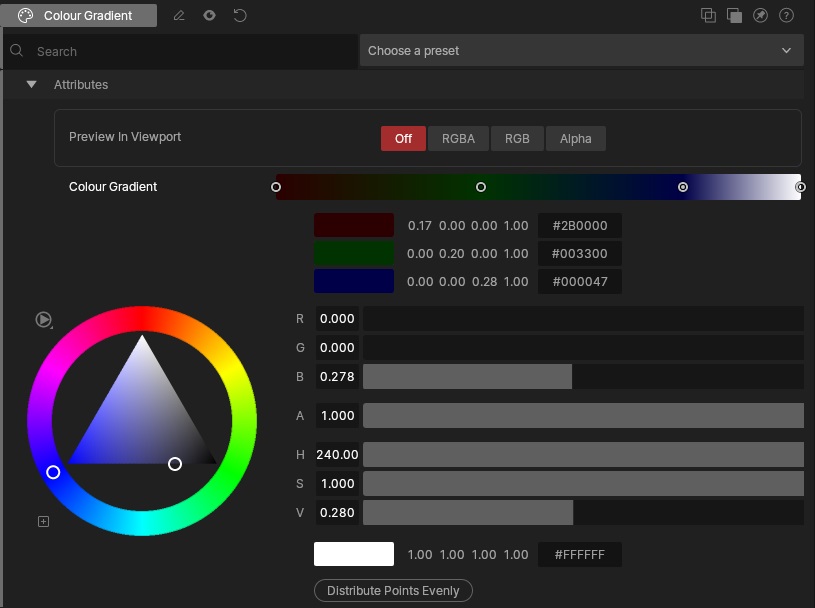
Updated: 29 Jun 2026
Generate and edit colour gradients using an arbitrary number of colour points.
This node generates a colour gradient by interpolating between user-defined colour points. New points can be added to the gradient, with each point assigned an individual colour value. Points may be selected and repositioned freely within the gradient range, allowing precise control over colour transitions and distribution.
The gradient output can be used anywhere a colour source is required, making it useful for creating ramps, palettes, animated colour transitions, and procedural colour effects.
Multiple points can occupy any position along the gradient, enabling sharp colour changes or smooth blends depending on the spacing and arrangement of points.
Add a control point by double-clicking the gradient at the desired location.
Delete a control point by selecting it and pressing the Delete key or by double-clicking the control point.
Reorder control points by dragging a control point to the left or right of another control point.
A gradient must contain at least two control points.
These properties control the core behaviours of the node.
| Parameter | Details |
|---|---|
| Colour Gradient | Editable colour point gradient. |
| Preview In Viewport |
Preview the generated image as an overlay in the viewport.
|
The properties control the time at which the node is active. See Timeline for editing time segments.
| Parameter | Details |
|---|---|
| Duration |
Control the duration of the node’s time segment.
|
| Node Time | The custom start and end time for the node. |
| Duration (Timecode) | The length of the node’s time segment (in time). |
| Duration (Frames) | The length of the node’s time segment (in frames). |
| Time Segment Enabled | Set whether the node’s time segment is enabled or not in the Timeline. |
This node has no inputs.
| Name | Description | Typical Input |
|---|---|---|
| Parameter Value Array | Used to set the parameters of the node using an array. | Parameter Array |