

Sound Modifier
Updated: 15 Sep 2026
Generates a modifier value based on the waveform of an audio source.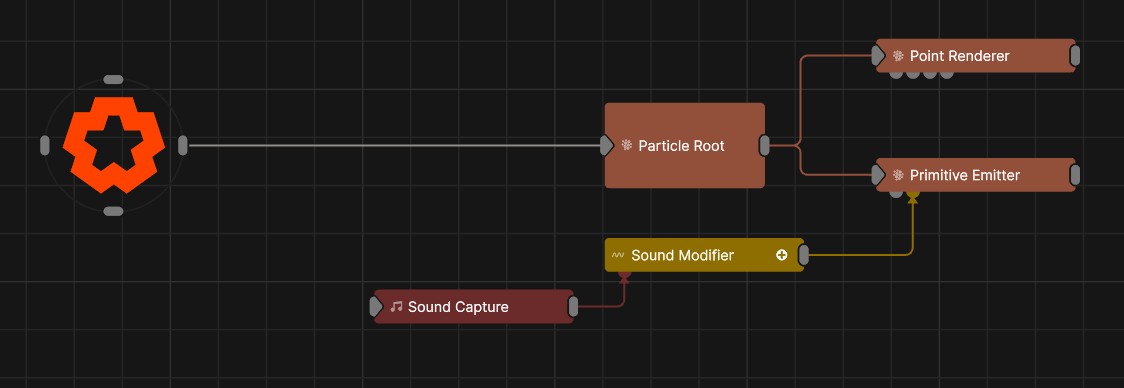
Updated: 15 Sep 2026
Generates a modifier value based on the waveform of an audio source.
This node outputs a modifier value based on amplitude if of of an audio file or a live captured audio input. The audio is split into a series of frequency bands, and the modifier can be set to respond to the amplitude of a specific frequency band, or the amplitude of the whole waveform.
Each increasing band corresponds to a doubling of the band’s center frequency.
The output is a numeric value that can be further processed with other modifiers, or directly connected to a parameter in another node, using the operation method selected.
This node can receive sound from a Sound Capture or Sound Loader node.
These properties control the core behaviours of the node.
| Parameter | Details |
|---|---|
| Current Value | Shows the current value of the modifier. Cannot be directly changed. |
| Blend Amount | The amount to blend the input modifier’s value with its new value. |
| Sound | Sound file used for the modifier. This can be overwritten with the sound input pin. |
| Looping | Controls whether the sound loops across timeline loops or resets. Only functions if a sound is selected within this node and a sound source isn’t connected to the Sound input. |
| Operation |
The operation to be performed on the targeted parameter.
|
| Restore Values | Toggle whether the values restore to 0. If unchecked, generated values incrementally add to the modifier value. |
| Channel | Determines whether the modifier will respond to the left, right, or stereo channels of the incoming sound |
| Channel |
Which audio channel is used.
|
| Frequency Band | Sets the Band EQ to a given band. Bands will double in frequency going upwards. |
| Time Offset | Offsets the time the value is modified from the time the waveform is played. |
| Change Threshold | Changes the threshold for what counts toward the modifier. |
| Attack | Controls the initial time between the current value to the peak. |
| Decay | Controls the time between the peak to the sustain level. |
| Min Value | Acts as a minimum threshold for extracting a range of values from the audio feed. |
| Max Value | Acts as a maximum threshold for extracting a range of values from the audio feed. |
| Max Clamp | Clamps the result. |
| Spikiness | You can use this property limit the rate of change of the output value. A value of 1 will apply no smoothing, a value of 0 will apply maximum smoothing. |
| Scale | Adjust the scale/range of the modifier. |
| Offset | Offset the waveform. |
| Smoothness | Adjust the amount of smoothing to applied to the output value. |
| Preview In Viewport | Preview the generated image as an overlay in the viewport. |
| Modifier Values | Read only graph to show the output of the modifier. |
| Parameter | Details |
|---|---|
| EQ Band 0 | The gain applied to frequency band 0 of the FFT when analysing audio, from the lowest band (0) to the highest (15). |
| EQ Band 1 | The gain applied to frequency band 1 of the FFT when analysing audio, from the lowest band (0) to the highest (15). |
| EQ Band 2 | The gain applied to frequency band 2 of the FFT when analysing audio, from the lowest band (0) to the highest (15). |
| EQ Band 3 | The gain applied to frequency band 3 of the FFT when analysing audio, from the lowest band (0) to the highest (15). |
| EQ Band 4 | The gain applied to frequency band 4 of the FFT when analysing audio, from the lowest band (0) to the highest (15). |
| EQ Band 5 | The gain applied to frequency band 5 of the FFT when analysing audio, from the lowest band (0) to the highest (15). |
| EQ Band 6 | The gain applied to frequency band 6 of the FFT when analysing audio, from the lowest band (0) to the highest (15). |
| EQ Band 7 | The gain applied to frequency band 7 of the FFT when analysing audio, from the lowest band (0) to the highest (15). |
| EQ Band 8 | The gain applied to frequency band 8 of the FFT when analysing audio, from the lowest band (0) to the highest (15). |
| EQ Band 9 | The gain applied to frequency band 9 of the FFT when analysing audio, from the lowest band (0) to the highest (15). |
| EQ Band 10 | The gain applied to frequency band 10 of the FFT when analysing audio, from the lowest band (0) to the highest (15). |
| EQ Band 11 | The gain applied to frequency band 11 of the FFT when analysing audio, from the lowest band (0) to the highest (15). |
| EQ Band 12 | The gain applied to frequency band 12 of the FFT when analysing audio, from the lowest band (0) to the highest (15). |
| EQ Band 13 | The gain applied to frequency band 13 of the FFT when analysing audio, from the lowest band (0) to the highest (15). |
| EQ Band 14 | The gain applied to frequency band 14 of the FFT when analysing audio, from the lowest band (0) to the highest (15). |
| EQ Band 15 | The gain applied to frequency band 15 of the FFT when analysing audio, from the lowest band (0) to the highest (15). |
The properties control the time at which the node is active. See Timeline for editing time segments.
| Parameter | Details |
|---|---|
| Duration |
Control the duration of the node’s time segment.
|
| Node Time | The custom start and end time for the node. |
| Duration (Timecode) | The length of the node’s time segment (in time). |
| Duration (Frames) | The length of the node’s time segment (in frames). |
| Time Segment Enabled | Set whether the node’s time segment is enabled or not in the Timeline. |
| Name | Description | Typical Input |
|---|---|---|
| Sound | Use the waveform from a given Sound Loader or Sound Capture node. | Sound Loader |
| Parameter Value Array | Used to set the parameters of the node using an array. | Parameter Array |