

Voxel Cone Shading
Updated: 15 Sep 2026
Light particles using voxel cone shading.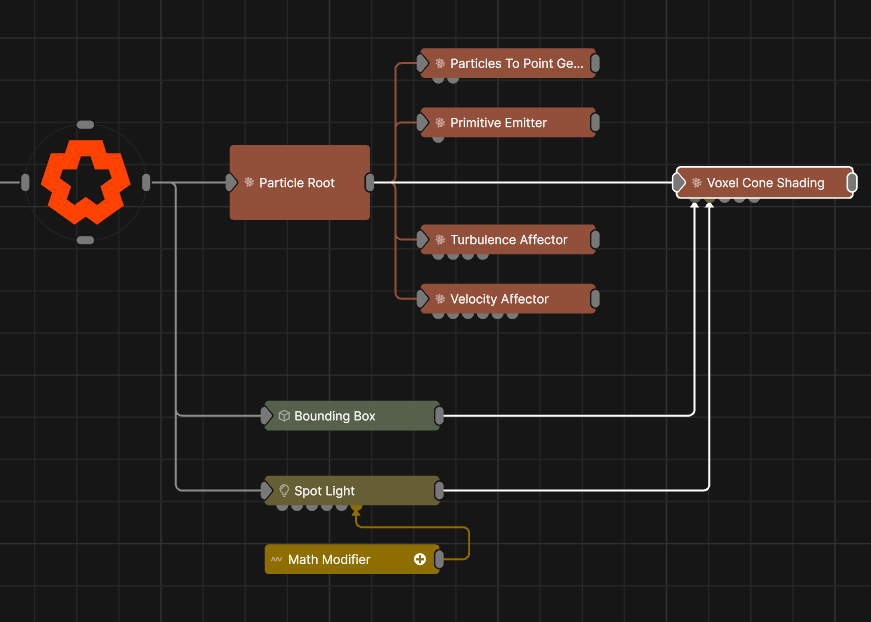
Updated: 15 Sep 2026
Light particles using voxel cone shading.
This node calculates lighting on particles using Voxel Cone Shading. This allows for soft shadows to be calculated that also take into account particle transparency. This effect must first voxelise the particles, which requires a limited spatial area denoted by a Bounding Box that can be connected via the Bounds Node. With no bounding box connected, an internal bounding box is used. Only particles within that area of space are included in the effect. The size of the spatial area also effects its resolution and visual result: large areas of space will reduce the precision of the effect.
At least one Light Node must be connected to the Light Node input in order for this effect to operate. Multiple lights can be connected and they will be evaluated sequentially to generate the shading result.
It is more efficient in terms of performance to use a single Voxel Cone Shading node with multiple light nodes connected, than multiple Voxel Cone Shading nodes each with one light node connected.
These properties control the core behaviours of the node.
| Parameter | Details |
|---|---|
| Density Scale | Scale how much light is absorbed per voxel. |
The properties control the time at which the node is active. See Timeline for editing time segments.
| Parameter | Details |
|---|---|
| Duration |
Control the duration of the node’s time segment.
|
| Node Time | The custom start and end time for the node. |
| Duration (Timecode) | The length of the node’s time segment (in time). |
| Duration (Frames) | The length of the node’s time segment (in frames). |
| Time Segment Enabled | Set whether the node’s time segment is enabled or not in the Timeline. |
| Name | Description | Typical Input |
|---|---|---|
| Bounds Node | Adds an area in which the shading can apply. | Bounding Box |
| Lights | Control which light nodes affect the particle shading. | Light |
| Sources | Add sources to select from. | Video Loader |
| Weights | Add a particle weight node to vary the node’s effect on the particle system. | Noise Weight |
| Affected Emitters | Choose which particle emitters can be affected by the affector. | Primitive Emitter |
| Transform Modifiers | Apply the transforms of another node to this node. | Null |
| Target Node | Modifiy the rotations of the node to always direct the z axis towards the input. | Null |
| Local Transform Override | Apply the transforms of another node to this node, relative to its parent. | Null |
| Parameter Value Array | Used to set the parameters of the node using an array. | Parameter Array |