

New Project
Updated: 3 Mar 2026
Updated: 3 Mar 2026
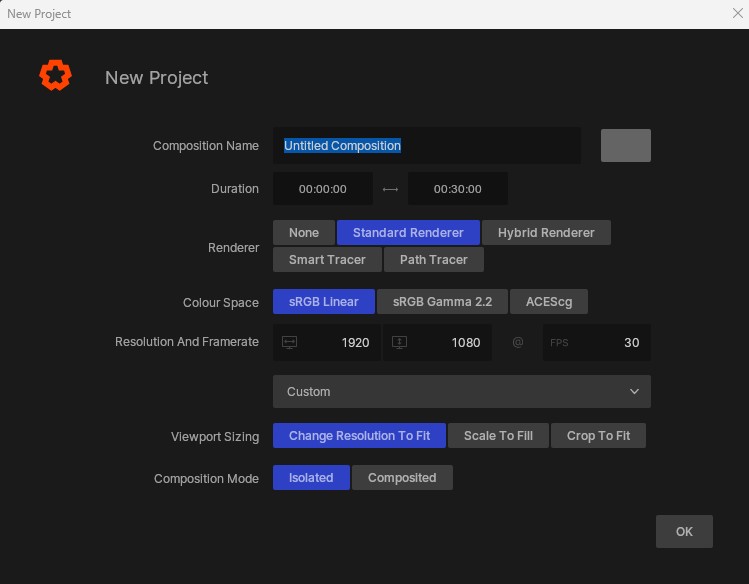
This window will appear when you launch a new project. It lets you configure key project settings on creation of the project.
| Label | Description |
|---|---|
| Composition Name and Colour | Control the name of the first in the project, and its colour in the timeline. |
| Duration | Set the length of the composition in the project. |
| Renderer | Select a renderer to add to your project. See NURA Rendering Architecture |
| Colour Space | Set the working colour space for the project. |
| Resolution And Frame Rate | Set the resolution and framerate targets for the project. |
| Presets | Select a preset resolution from the drop down menu. This will override the above settings. |
| Viewport Sizing | Controls how the viewport scales to match the render resolution. - Change Resolution To Fit will scale the rendered resolution to fit the size of your render viewport on screen. - Scale To Fill will render the whole resolution of your project, and then scale it down to fit the viewport. - Crop To Fit will render the whole resolution, and display it on your viewport with no scaling applied. |
| Composition Mode | Manage how the project treats different compositions in the same project. - Isolated, each composition is treated exclusively, and cannot be combined. Useful for Real-Time Exports where each composition is treated as a separate scene. - Composited, compositions can be layered on top of each other, creating a single project where each composition is blended together to one output. |